Adding new spectrographs
In this tutorial we are going to learn how to add a new spectrograph to ACTIN.
There are two main routes:
Forcing
ACTINto read a spectrograph from a specificpythonfile.Adding a new class to the
spectrographsfolder insideACTIN, and the new spectrograph will be always available automatically.
Rules to create spectrograph classes:
The file name and class names should be the same and be the name stored in the fits files under the keyword
INSTRUM. For example, for HARPS-N, the file and class names areHARPNwhich is the instrument ID in the fits files.The class must have at least two attributes in the form of dictionaries called
spectrumandheaders, with the spectrum and fits headers data, respectively. Thespectrumdictionary must contain the keyswavefor the stellar rest frame wavelength, andflux, for the deblazed flux. Theheadersdictionary can be empty, if no information is required from the headers.The class
__init__function must have ahdupositional argument, for the fits HDU, and at least a**spec_kwkeyword argument to absorb other keyword arguments not used by the specific spectrograph class, such as thefileargument which is used by the implemented spectrographs.
Let’s suppose you want to calculate activity indices for CORALIE. You can retrieve the flux and wavelength and use actin.CalcInd as explained in the Using ACTIN with any spectra tutorial, or you can make your own spectrograph class.
Let’s start by getting the CORALIE fits file.
[1]:
import os
file = os.path.join(os.pardir, "actin2", "test", "CORALIE", "CORALIE.2004-02-19T06:22:20.001_s1d_A.fits")
Now suppose you created the following class to read the s1d spectra for CORALIE, and saved it somewhere with the name CORALIE_new.py:
import numpy as np


spec_hdrs = dict(
    instr   = 'HIERARCH ESO OBS INSTRUMENT',
    bjd     = 'HIERARCH ESO DRS BJD',
    spec_rv = 'HIERARCH ESO OBS TARG RADVEL', # low precision RV [km/s]
    berv    = 'HIERARCH ESO DRS BERV', # Barycentric Earth Radial Velocity [km/s]
)


class CORALIE_new:
    def __init__(self, hdu, **spec_kw):

        instr = 'CORALIE'

        # Create dictionary to hold the spectrum data
        spec = dict()

        # Obtain the flux and headers from fits HDU
        spec['flux_raw'] = hdu[0].data
        hdr = hdu[0].header
        hdu.close()

        # Calculate wavelength grid
        spec['wave_raw'] = hdr['CRVAL1'] + hdr['CDELT1'] * np.arange(hdr['NAXIS1'])

        # Get spectrum selected header values:
        headers = {}
        for key, hdr_id in zip(spec_hdrs.keys(), spec_hdrs.values()):
            try:
                headers[key] = hdr[hdr_id]
            except KeyError:
                headers[key] = None

        headers['instr'] = instr

        # Convert RV and BERV to m/s
        for key in headers.keys():
            if key in ['spec_rv', 'berv']:
                headers[key] *= 1e3 # to m/s

        # Correct spectrum to stellar rest frame
        c = 299792458.0 # light velocity [m/s]
        dwave = headers['spec_rv'] * spec['wave_raw'] / c
        spec['wave'] = spec['wave_raw'] - dwave

        # Flux photon noise
        spec['flux_err'] = np.sqrt(abs(spec['flux_raw']))

        # s1d files already deblazed
        spec['flux'] = spec['flux_raw']


        # output:
        self.spectrum = spec      # spectrum dict (must have 'wave' and 'flux')
        self.headers = headers    # all selected headers dict
Note that the name of the file is the same as the class.
This class is available in the test folder of ACTIN and we will use it to read the file above.
[2]:
spec_file_in = os.path.join(os.pardir, "actin2", "test", "CORALIE", "CORALIE_new.py")
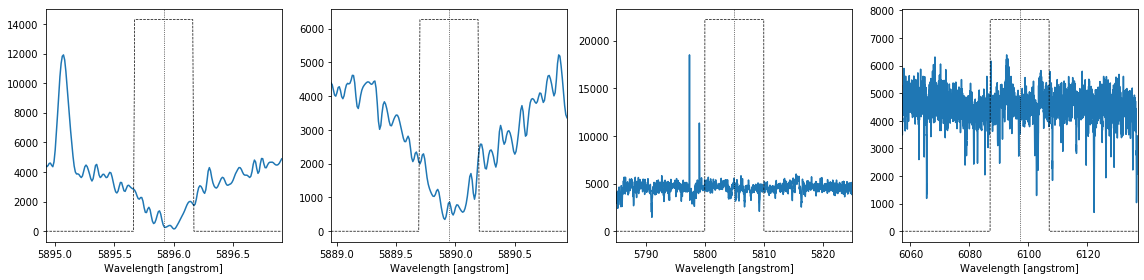
And finally we will read the file while forcing ACTIN to use the new spectrograph class by using the spec_kw argument and spec_file_in and calculate an activity index, in this case using the sodium D2 lines, I_NaI:
[3]:
from actin2 import ACTIN
actin = ACTIN()

actin.run(file, 'I_NaI', spec_kw=dict(spec_file_in=spec_file_in))
100%|██████████| 1/1 [00:00<00:00, 9.88it/s]
[3]:
| instr | bjd | spec_rv | berv | file | I_NaI | I_NaI_err | I_NaI_Rneg | actin_ver | |
|---|---|---|---|---|---|---|---|---|---|
| 0 | CORALIE | 2.453055e+06 | 930.0 | 15574.51973 | CORALIE.2004-02-19T06:22:20.001_s1d_A.fits | 0.27232 | 0.00078 | 0.0 | 2.0 beta 8 |
And check the index lines:
[4]:
%matplotlib inline

actin.plot_index_lines(file, 'I_NaI', spec_kw=dict(spec_file_in=spec_file_in))
If you want ACTIN to recognise the new spectrograph automatically, you can save the CORAlIE_new.py file to the actin2/spectrographs directory.